Desktop GUI
get_MNV ships a native desktop application that runs the same analysis engine as the command line, with drag-and-drop inputs and an interactive results viewer.
Install
Download the latest build for your platform from the Releases page.
macOS users
The app is not signed with an Apple Developer certificate. On first launch, right-click the app → Open → click Open in the dialog.
Workflow
- Add inputs. Drop your variant file (VCF or iVar TSV), the reference FASTA, a gene annotation (GFF/GFF3 or a genes TSV) and, optionally, a coordinate- sorted indexed BAM.
- Set parameters. The form exposes the common options: genetic code, quality and MAPQ thresholds, SNP/MNV read-count, frequency and strand filters, and the indel-tuning knobs.
- Run. Analyze a single sample, or several matched samples in one batch.
- Inspect and export. Browse, sort and filter the results table, then export to TSV or VCF.
For a walkthrough with screenshots, see the Desktop GUI tutorial.
How several samples are paired with their BAMs
Dropping a set of variant files and a set of BAMs at once pairs them by name. Three rules are tried, strongest first, and the strongest match wins across the whole set rather than going file by file:
| Rank | Rule | Example |
|---|---|---|
| 1 | The file stems are the same | sample1.vcf and sample1.bam |
| 2 | One stem starts with the other, at a dot | G35894.var.snp.vcf and G35894.bam |
| 3 | The first dot-segment is the same | MIP00022.MTB_anc.ann.vcf and MIP00022.MTB_anc.final.bam |
A variant file with more than one equally good candidate is left unpaired on purpose. The order files happen to arrive in says nothing about whose reads they are, and a sample counted against another sample's molecules is wrong in every read count, frequency, strand arm and phasing figure it reports, with nothing on screen to show it. Pair those by hand: select the sample and set its BAM. The sample list names the BAM each sample was given, so you can check the pairing before running.
If exactly one BAM is dropped and nothing matched, it is used for every sample, which is the common case of one alignment and several callsets.
Where the form differs from the CLI
The app runs the same engine, and every knob it does not show falls back to the
CLI default. Five of the values it does show are deliberately more conservative,
so the same files can give fewer rows here than get_mnv with no flags:
| Form field | App | CLI | Effect |
|---|---|---|---|
| Min MAPQ | 20 |
0 |
multi-mapping reads are not counted |
| Min SNP reads | 2 |
0 |
a single-read SNP is dropped |
| Min MNV reads | 2 |
0 |
a single-read haplotype is dropped |
| Normalize alleles | on | off | shared REF/ALT context is trimmed first |
| Split multiallelic | on | off | multiallelic records are split, not refused |
Set them to the CLI values in the form to reproduce a command-line run exactly. The list is enforced by a test that reads the front end's defaults and compares them with the CLI's own parser, so a sixth divergence fails the build.
Genomic track viewer
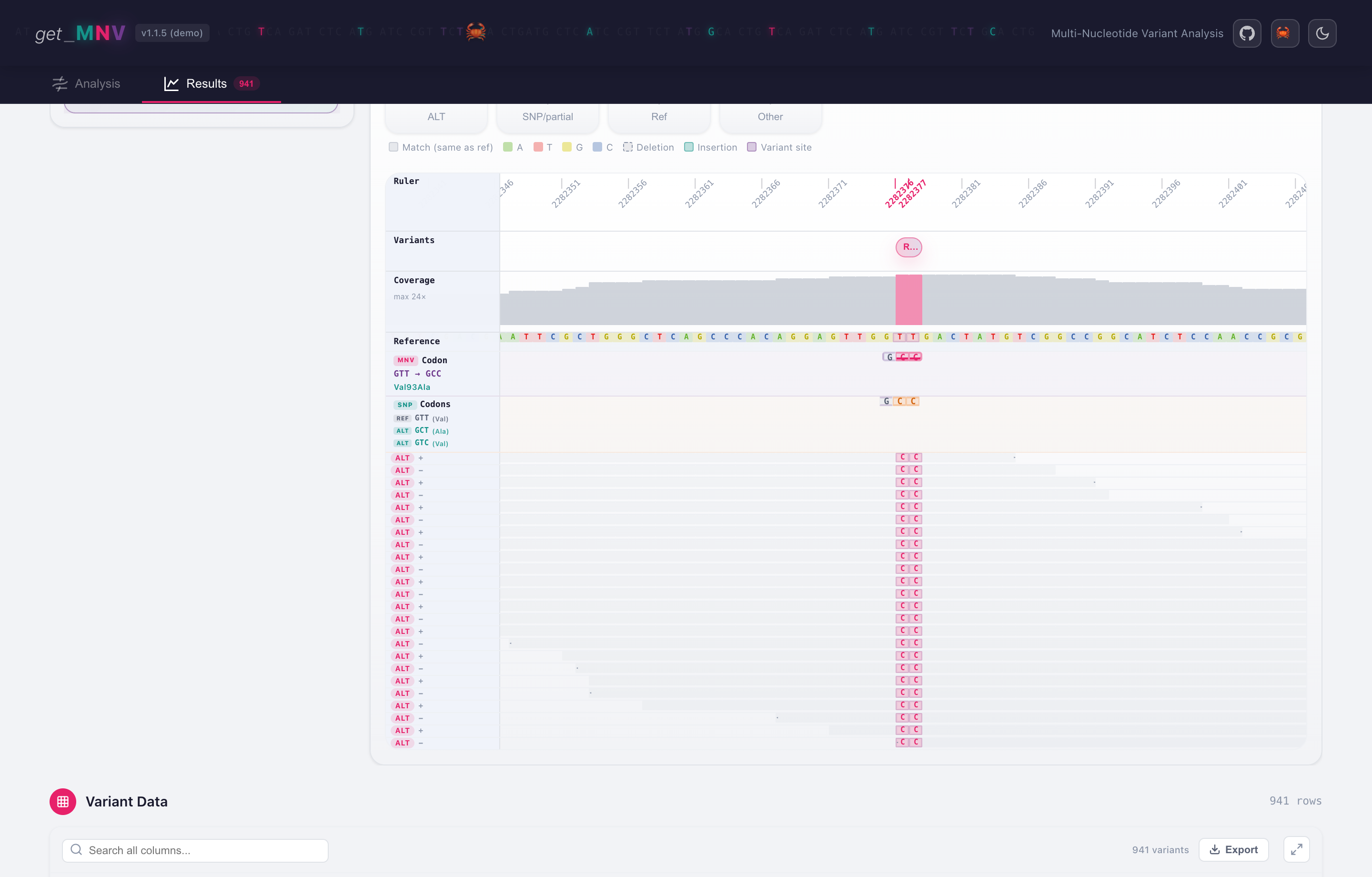
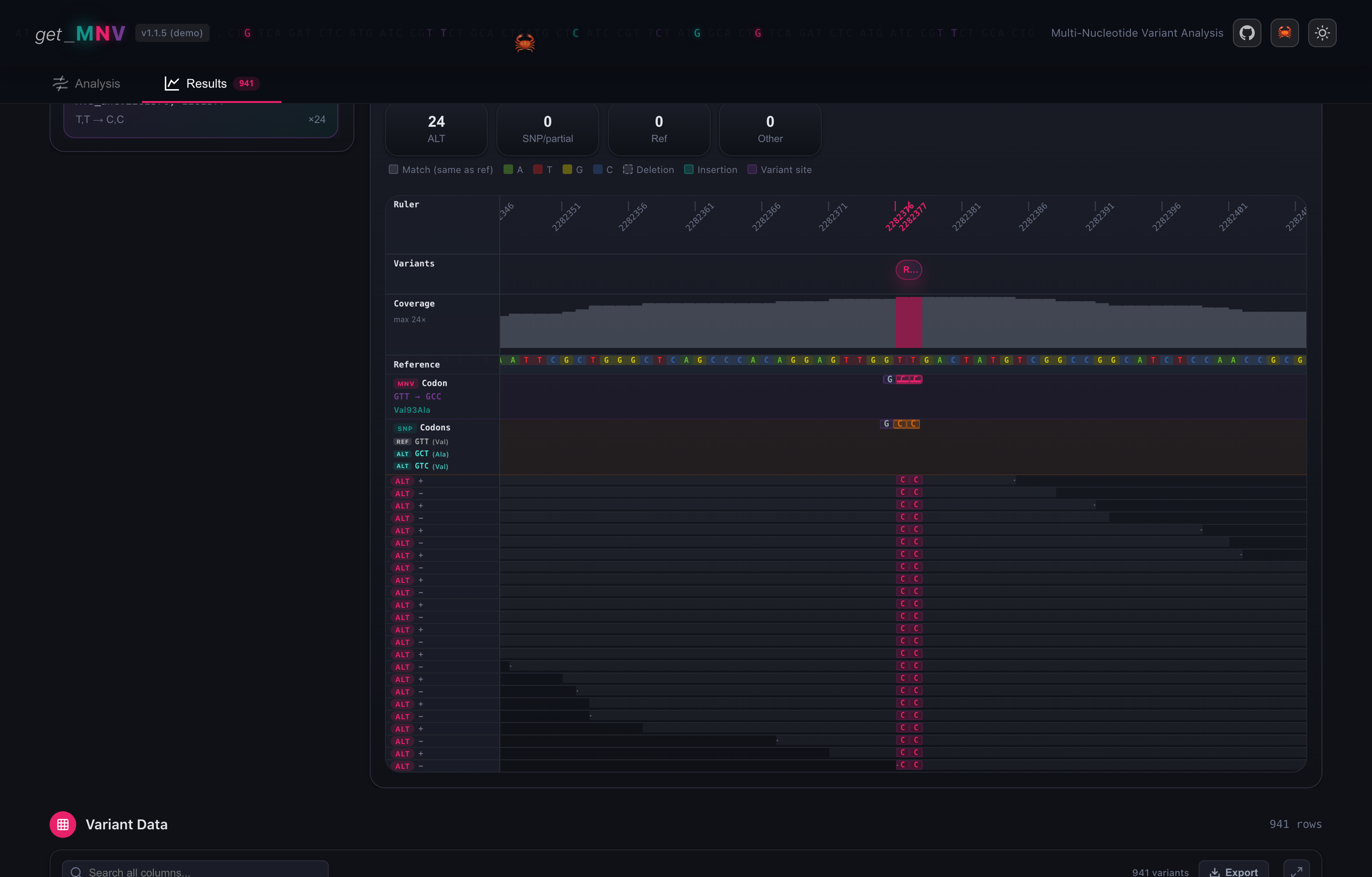
The track viewer for the Rv2036 MNV (GTT → GCC, Val93Ala) in the bundled example: codon tracks plus the read pileup, with the ALT bases highlighted across all 24 supporting reads.
Selecting a variant row opens an IGV-style view that lines up, column by column:
- a ruler marking the variant positions and the displayed window;
- the reference sequence and per-position coverage;
- codon tracks showing the reference codon, the individual SNP codons and the combined MNV codon, with the resulting amino acid change;
- the read pileup, one row per supporting read, with the ALT bases highlighted and reads coloured by the support they provide (MNV / partial / reference).
This makes it easy to confirm visually that the reads carry the combined codon change, not just the individual SNVs.
Try it with the example
Follow the Command Line Tutorial tutorial and load the
bundled example/G35894.demo.bam. Opening the Rv2036 row shows all 24
reads carrying both ALT bases of the GTT → GCC (Val93Ala) codon.
Read viewer requirements
The pileup needs a coordinate-sorted, indexed BAM (.bai) and an indexed
FASTA (.fai); get_MNV creates the FASTA index automatically when needed.
Rows without read data still show the codon and amino-acid tracks.
Build from source
The GUI is a Tauri app (Rust backend + web frontend). To run it from a checkout:
bash scripts/dev.sh                # development
bash scripts/build_gui_bundle.sh   # production .app / .dmg bundle